



If you value privacy and prefer not to share your ID with potentially shady third parties just to manage your crypto assets, a no-KYC crypto wallet might be just what you’re looking for.
Yes, you read that right: you can use an anonymous crypto wallet to buy, sell, stake, and swap your assets without uploading your photo, government ID, or proof of address. This reduces your exposure to data breaches and misuse of your sensitive information. But there’s a trade-off: what you gain in privacy, speed, and accessibility, you sacrifice in regulatory oversight and security guarantees that come with centralized, KYC-compliant services.
That’s why choosing the right no-KYC crypto wallet is so important, and often challenging, since no two anonymous wallets are alike. Some focus on strong security, others on broad coin support, and still others on compatibility with hardware wallets for extra safety.
Our research team has thoroughly ranked and reviewed the top six no-KYC wallets to help you select the one that best suits your needs.
TL.DR: Best Wallet, Zengo, and Cypherock X1 stand out in our assessment for their strong security, broad coin support, and versatility across different blockchain ecosystems.
Overview – Top Anonymous Wallets to Use in 2026
Based on our research and testing, here are our picks of 2026‘s top no-KYC wallets.
| Best Wallet | Best all-around no-KYC wallet: broad features, mobile-first, DeFi integration |
| Zengo | Anonymous wallet without traditionalseed phrase vulnerabilities |
| Cypherock | Maximum hardware security with decentralized key shards |
| Ledger | Touchscreen hardware wallet driven by secure chip with strong reputation |
| Tangem | Portable card and ring wallet for easy physical access |
| Ellipal | Air-gapped cold wallet for maximum isolation from network threats |
What Is a No-KYC Crypto Wallet?
A no-KYC wallet is a crypto wallet that allows you to transact without undergoing identity verification. That means you don’t need to submit personal details, government-approved identity documents, or proof of address to use the wallet’s core functions.
Why is there KYC in the first place? It’s because many wallet providers (especially custodial ones) are mandated by authorities to verify their users’ identities to comply with anti-money-laundering and combating the financing of terrorism (AML/CFT) regulations. The goal is to prevent users from misusing their wallets for illicit activities.
For custodial crypto wallets (where a third party holds your private keys), identity verification is common. However, non-custodial wallets (where you control the keys) are much more likely to offer no-KYC onboarding.
Depending on the wallet provider, you’ll typically need to complete one of three types of KYC:
- KYC Level 1: Requires you to submit basic personal information, including your name, date of birth, and address.
- KYC Level 2: Requires a government-issued photo ID, such as a passport or driver’s license.
- KYC Level 3: Requires submitting additional documents, such as proof of address, a live selfie, or documents verifying the source of funds.
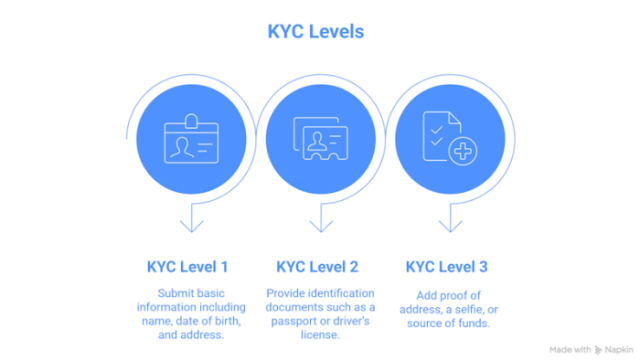
Your wallet privileges often depend on the level of KYC completed. For example, KYC Level 3 gives you the highest withdrawal limits and access to features such as margin trading.
Furthermore, no-KYC wallets are typically exempt from country-based restrictions. They’re globally available, enabling users to manage their crypto assets anonymously from anywhere in the world, including regions with limited banking access or restrictive regulations.
Next, we’ll explore why you should use a no-KYC wallet.
Why Use a No-KYC Wallet?
As mentioned earlier, the KYC process is crucial for meeting legal compliance and combating money laundering and terrorist financing. But it poses privacy and security risks for regular users. That’s why no-KYC wallets are popular among crypto enthusiasts.
Here are several more reasons why users might opt for a no-KYC wallet:
- Avoiding government surveillance: Because your wallet address isn’t linked to your real identity, it’s much harder for authorities to track your financial activity.
- Accessing financial tools in restrictive countries: Enables users in countries with stringent cryptocurrency regulations to participate in the cryptocurrency market.
- Get trading instantly: As there’s no waiting for approval, you can deposit, withdraw, and trade funds instantly. This is especially useful for the fast-moving crypto market.
- Greater asset and privacy control: Because you’re in full control of your funds, no third party can freeze or seize your funds. Plus, as you don’t share any personally identifiable information (PII) with the wallet, you reduce the risk that your crypto activities can be traced back to you.
- Direct access to Web3 and DeFi: No-KYC software wallets, like Best Wallet, integrate with a wide range of dApps and decentralized exchanges (DEXs), giving users seamless access to all the lending, staking, and swapping capabilities of the Web3 ecosystem.
With the basics out of the way, let’s look at which no-KYC wallet actually stands out in real-world use.
Expert Analysis – The Top 6 Best No-KYC Wallets in 2026 Reviewed
Here are the top six wallets that stood out in our testing and research.
1. Best Wallet – Best All-Around No-KYC Wallet: Broad Features, Mobile-First, DeFi Integration
No-KYC: Yes
Web3 features: DEX aggregator, crypto launchpad, presale access, NFTs, dApps staking aggregator (upcoming)
Security: 2FA, biometric security, encrypted cloud backup, MPC key-share technology
Best Wallet stands out as the top no-KYC crypto wallet on our list for its strong privacy, security, and functionality. It is a non-custodial wallet, so you have complete control over your private keys and, therefore, your crypto assets.
The wallet already supports over 1,000 coins and provides access to more than 300 DEXs and 30 bridges through a DEX aggregator, making it ideal for users managing diverse cryptocurrency portfolios.
The ambitious project is currently in Phase Two of its planned six-phase roadmap.
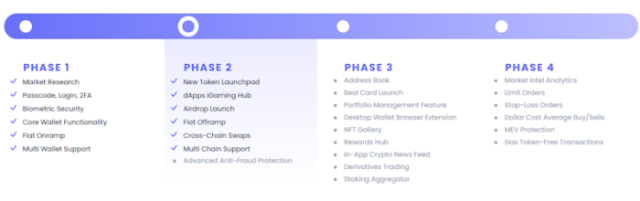
As you can see in its roadmap, new features will roll out as the project progresses into higher phases. Its current supported networks include Bitcoin, Ethereum, BNB Chain, Solana, XRP, TON, Base, and Arbitrum, but this will expand to over 60 chains soon.
Already, the wallet supports seamless coin swapping. Its autorouter helps you find the best exchange rates and lowest fees for cross-chain swaps.
For those who want to stake their coins, Best Wallet has planned to offer a staking platform with an integrated decentralized aggregator in Phase 3. This feature, once it launches, will help users earn some of the highest APYs on the market.
Best Wallet adds extra utility through its native token, $BEST. Holders of $BEST receive additional benefits, including reduced transaction fees, governance rights within the Best Wallet ecosystem, airdrops, and staking rewards.
In terms of setup and usability, Best Wallet is straightforward. The mobile app is compatible with both Android and iOS devices.
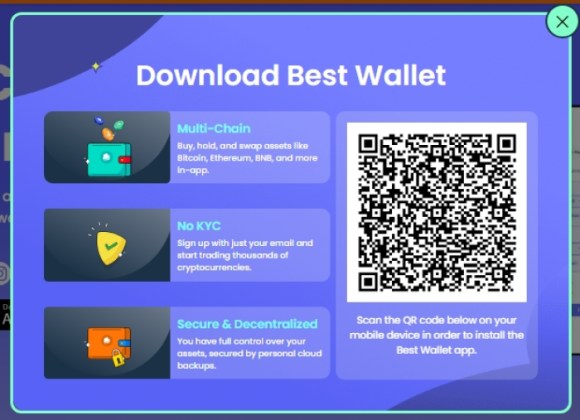
Once you download the app, the setup takes just a few minutes. You can sign up using an email address, Gmail, or Apple ID and set a PIN or Face ID/Touch ID for login. You can also import another wallet into your Best Wallet.
While Best Wallet excels in functionality and usability, its security is equally impressive. It has implemented Fireblocks-backed MPC security, which is the leading institutional security standard for crypto wallets.
What’s more, Best Wallet offers two-factor authentication (2FA) and biometric authentication for enhanced account security. It has also implemented end-to-end encryption. So no one, not even Best Wallet, can see your private keys.
CertiK, the largest blockchain security audit firm, has audited Best Wallet and found no critical vulnerabilities.
Best Wallet is free to use. Read our full Best Wallet review to learn more about it.
2. Zengo Wallet – Anonymous Wallet Without Traditional Seed Phrase Vulnerabilities
No-KYC: Yes
Web3 features: Staking, multi-chain swapping, dApps, DeFi
Security: MPC technology, MFA, Biometric authentication, Web3 firewall
We’ve listed Zengo Wallet in the second spot on our list due to its strong security features, which eliminate the need for a traditional seed phrase. This is a common point of failure for many crypto users. It achieves this using Multi-Party Computation technology.
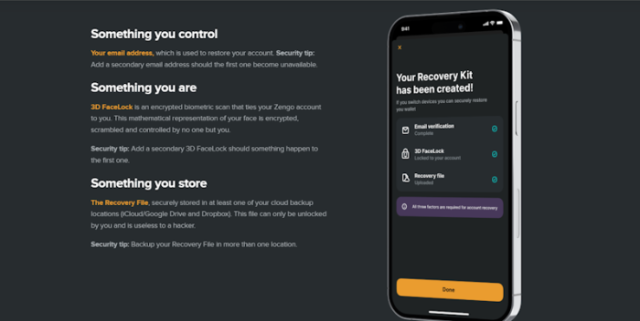
Your Zengo Recovery Kit includes email authentication, your 3D FaceLock (an encrypted biometric scan), and a Recovery File stored in your default personal cloud storage.
The Recovery File isn’t a private key, per se, and can’t be used alone to access your account. You’ll also need to go through email authentication to restore your wallet.
Zengo recommends using 3D FaceLock as an additional factor for wallet recovery, though it’s not mandatory. However, if you’re a Zengo Pro Advanced Security user, you’ll be required to use a 3D FaceLock for wallet recovery.
As you can see, you won’t need to remember or store a seed phrase to recover your wallet with Zengo. You only need to keep your Recovery File in your cloud storage, but it can’t restore your wallet without other verification factors. So you don’t have to worry about your seed phrase being compromised.
 Once you’re in, you’ll find that Zengo Wallet is a fully featured mobile crypto wallet. You can easily buy, sell, and swap cryptocurrencies.
And if you want to earn passive income, Zengo lets you stake Ethereum and earn up to 8% annually.
Beyond coins, Zengo also supports NFTs and DeFi, gaming, and dApps. The WalletConnect feature means you can easily connect to OpenSea, Sandbox, Uniswap, ENS, and various other dApps.
With the core security clear, let’s explore Zengo’s transparency. Its cryptography is open-source, so anyone can review and verify the code.
However, the app and server code are closed source, which is understandable since it is a proprietary app and the company wants to protect its technology.
On the user-experience front, the setup process feels quick and easy. The mobile app is compatible with both Android and iOS devices. So, you can use it on your existing phone without any change.
Zengo offers both free and Pro versions. The free plan includes everything you need to store, buy, swap, and secure your crypto with MPC tech and FaceLock.
If you upgrade to Zengo Pro at $9.99 per month (or $49.99/year), you’ll unlock extra features like legacy wallet backup, a Web3 firewall to block scams, priority support, and up to five wallet accounts in one app. It’s an excellent choice for users who want more control and added security.
Though Zengo is a solid wallet, it has a few downsides. You can’t connect it to hardware wallets or import existing wallets into Zengo.
Aside from these limitations, it remains a secure and beginner-friendly option.
3. Cypherock Wallet – Maximum Hardware Security With Decentralized Key Shards
No-KYC: Yes
Web3 features: Swapping across 15+ networks, support for d’Apps and NFTs through WalletConnect
Security: Decentralized private key storage, tamper-proof EAL6+ secure element, third-party security audit
Cypherock X1 is an open-source hardware wallet that has gained recognition in the industry for its use of Shamir’s Secret Sharing (SSS) cryptography method. It splits your private keys into five parts (1 Vault + 4 Cards). You only need any two parts to access your crypto, so you don’t need all four cards at once.
The NFC cards utilize an EAL6+ Secure Element, providing the same level of protection as bank credit cards. A smart approach to safeguard your wallet is to store the cards in different secure locations to reduce the risk of theft or loss.
For extra protection, you can set a PIN on your device. This means that even if someone gains access to your device and one of your cards, they still can’t access your funds.
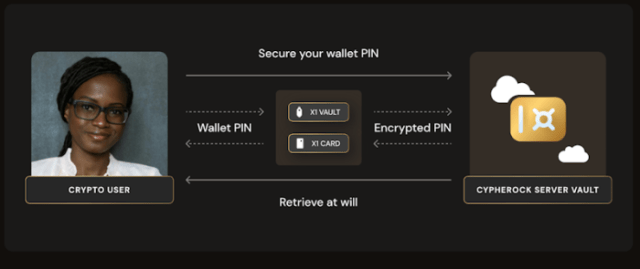
You can also restore your wallet using any two of the four X1 Cards, so there’s no need to write down a seed phrase on paper. That said, your crypto assets remain protected from natural disasters or theft if you store your two cards in different geographic locations.
Keylabs has audited the wallet for security.
Security aside, Cypherock X1 has many valuable features to help you manage your crypto assets. With its companion app, CySync, you can:
- Manage over 18K assets
- Swap crypto instantly
- Use your favorite dApps and DeFi through WalletConnect
- Buy crypto with fiat using an on-ramp
Even better, Cypherock X1 allows you to manage up to four wallets on a single device. This means you can use different accounts for different purposes, such as one for regular trading and another for long-term storage.
Let’s move to the companion app. You can download the CySync app for Windows, macOS, Linux, Android, and iOS. Multi-device support gives you more flexibility.
While the setup may seem lengthy, as you’ll need to tap all four cards to the device to set up your private keys, the process is actually quite quick, thanks to clear on-screen instructions.
Worried about how your loved ones will inherit your crypto assets? Its Estate Recovery feature lets you securely pass on your crypto assets to your designated beneficiary.
Overall, if you want a wallet that blends open-source security, simplicity, and peace of mind, Cypherock X1 checks every box. It can cost between $99 and $249 (including an ongoing discount), depending on the model you choose to buy.
LEARN MORE ABOUT CYPHEROCK WALLET
4. Ledger Wallet – Touchscreen Hardware Wallet With Strong Reputation Driven by Secure Chip
No-KYC: Yes
Web3 features: Staking, NFTs, DeFi, and cross-chain swapping
Security: PIN protection, CC EAL6+ certified secure chip, proprietary operating system (BOLOS) for enhanced security
Ledger is a reputable name among the best hardware wallets, offering a range of products to suit the varied needs of cryptocurrency investors.
The company has rebranded its devices, now referring to them as ‘Signers’. All Ledger Signers can manage over 15 crypto assets. You can buy, sell, stake, and swap crypto assets using these devices.
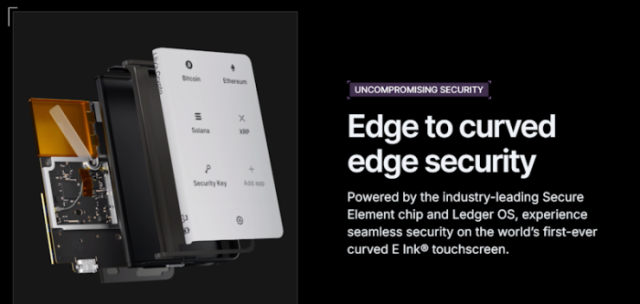
When it comes to security, Ledger Signers employ multiple layers of protection, including PIN protection, a Secure Element Chip, isolated transaction signing, and a secure screen driven by the chip, all designed to prevent malware infection.
What’s more, the company’s internal security team, Ledger Donjon, rigorously tests its firmware for vulnerabilities. The company even employs third-party auditors to review Ledger OS before each release. While the Ledger Live app is entirely open source, Ledger OS is only partially reviewable and verifiable by the general public.
To connect your Ledger Signer to your device, you’ll need to download the Ledger Live app, which is available for Windows, Linux, macOS, Android, and iOS devices.
Among its offerings, Ledger Stax is a flagship model that features a 3.7” Curved E Ink® touchscreen for optimal readability. It also includes a CC EAL6+ certified Secure Element chip.
Setting up your Ledger Signer is a quick process. You download Ledger Live, create a PIN and a 24-word recovery code, install the required crypto apps, add your accounts, and start using your Ledger Signer.
The entire process can take anywhere from 8 to 20 minutes, depending on your Ledger model.
Additionally, you can integrate Ledger Signers with Monero’s native GUI wallet, letting you complete XMR transactions anonymously.
All things considered, Ledger Signer offers strong cold storage security and might suit you well if you want a touchscreen wallet that works on both desktop and mobile devices.
However, Cypherock is a better choice if you can manage without a touchscreen. It provides you with decentralized private keys and eliminates the need to manually back up a seed phrase.
Ledger Signers cost between $59 and $399, based on the model.
LEARN MORE ABOUT LEDGER WALLET
5. Tangem Wallet – Portable Card and Ring Wallet for Easy Physical Access
No-KYC: Yes
Web3 features: Staking, swapping, and real-time cryptocurrency data directly within the Tangem mobile app, NFTs
Security: Tamper-proof EAL6+ cards, no seed phrase backup needed, multi-card backup, multi-factor authentication, biometric security
Like the Cypherock X1, Tangem is a card-based, non-custodial hardware wallet. What sets it apart, however, is the Tangem Ring, which serves as an additional hardware wallet.
You can buy a set of three cards, two cards, or a set of two cards and a ring. The Tangem Ring provides portability and convenience without compromising security.
Are you concerned about the build quality of your Tangem Ring? You don’t want to wear anything tacky or likely to get scratched or damaged. Fortunately, the Tangem ring is built to withstand a nuclear winter. It’s resistant to water, extreme temperatures, and X-rays.
When you set up your Tangem wallet, your private keys are stored on the cards and the ring. All of them (Cards and Ring) feature an EAL6+ CC-certified Secure Element chip that protects your hardware wallet against both invasive and non-invasive attacks.
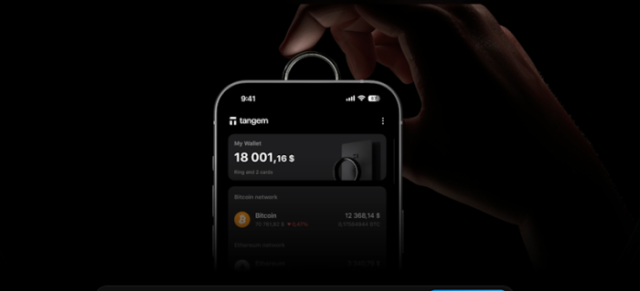
We also like the fact that Tangem doesn’t require you to keep your seed phrase separately. The cards and the ring are used to back up the seed phrase.
Moving on to its features, Tangem allows you to manage over 13K crypto assets across more than 60 networks. It offers staking and swapping, as well as NFT support for selected networks.
The Tangem mobile app is compatible with both Android and iOS devices. It’s open-source, so anyone can review its code for potential vulnerabilities.
Although Tangem Wallet resembles the Cypherock X1, as both use cards for authentication, their key management approaches differ.
Tangem stores your entire private key on a single card or ring, with identical backups, creating a single point of storage. Cypherock X1, however, splits your key into five encrypted parts using Shamir’s Secret Sharing, removing any single point of failure.
We believe Cypherock’s approach to private key management is more secure than Tangem’s. But we are impressed with Tangem’s 25-year replacement warranty.
You can purchase Tangem wallets for $49 to $162 (including ongoing discounts), depending on the product you select.
LEARN MORE ABOUT TANGEM WALLET
6. Ellipal Wallet – Air-Gapped Cold Wallet for Maximum Isolation From Network Threats
No-KYC: Yes
Web3 features: Staking, swapping, and support for 200+ dApps through MetaMask and WalletConnect integration
Security: Air-gapped design, Tamper-proof EAL5+ chip, anti-tamper technology
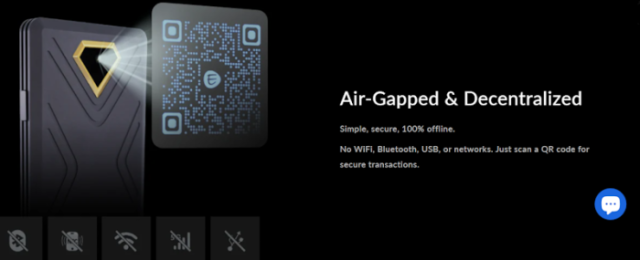
Ellipal claims to offer the world’s first air-gapped cold wallet. Indeed, we tested the Ellipal Titan 2.0 and were impressed by how it authenticates transactions using nothing more than a QR code. That means zero wires or wireless connections. That’s cold, alright.
It features a 4-inch screen, so you can check review details and approve transactions without straining your eyes.
For security, the Ellipal Titan 2.0 features a CC EAL5+ Secure Element tamper-proof chip. Additionally, its full-metal body protects it against tampering. If any tampering is detected, the wallet will automatically delete your private information.
We also appreciated its secret secondary wallet feature, which allows you to maintain a backup account with a separate password. That way, your assets in the secondary wallet remain protected even in the extreme situation where someone gains access to your primary wallet.
Ellipal supports over 40 blockchains, 50+ stablecoins, and more than 10K tokens. This includes $BTC, $ETH, $BNB, $SOL, $XRP, $ADA, $USDT, $USDC, $DAI, and many others. You can also use it to manage NFTs on Ethereum and Polygon.
What’s more, it lets you swap different crypto assets and stake your coins. To expand its Web3 capabilities, you can connect it to 200+ dApps using MetaMask and WalletConnect. The company also offers the Ellipal X card wallet, which utilizes an NFC connection to authorize transactions.
The Ellipal Wallet is compatible with both Android and iOS devices, letting you manage an unlimited number of wallets within a single app. You can also create or migrate any BIP-39 wallet to Ellipal.
If you’re looking for a fully air-gapped, hardware‑based wallet, Ellipal is a good choice. Its pricing ranges from $59 to $129, depending on which model you choose.
LEARN MORE ABOUT ELLIPAL WALLET
How To Choose the Right KYC-Free Wallet for You
Here are some key criteria to help you select the right KYC-free wallet for your needs.
1. Reputation and trust
You can gauge a wallet’s trust and reputation by checking independent security audits and community reviews. Open-source wallets tend to offer better security than closed-source ones, as anyone can review and verify their open-source code for vulnerabilities.
2. Security and privacy
You should always opt for a non-custodial wallet, as it provides you with complete control over private keys. Also, look for wallet security measures, such as biometric authentication, MPC key share technology, and air-gapped signing.
If it’s a hardware wallet, ensure it comes with a tamper-proof chip featuring an EAL6+ Secure Element.
As different wallets offer varying levels of transaction privacy and IP masking, it’s essential to carefully read the privacy policy to make sure you select a wallet that meets your specific privacy requirements.
3. Cryptocurrency and blockchain support
You don’t want to end up buying a wallet that doesn’t support your crypto assets. So, check the supported currencies and blockchains of the wallets you’re narrowing down.
If you’re going to manage multi-chain assets, make sure you purchase a multi-chain, no-KYC wallet.
4. Backup and recovery options
Good no-KYC wallets offer easy seed phrase backup and secure recovery. Typically, you’re responsible for writing down and keeping your seed phrase safe.
However, some wallets, such as Cypherock X1 and Tangem, let you save a backup on cards, eliminating the need to write and store a seed phrase. If you want to easily pass on your crypto assets to your loved ones, choose a wallet that offers an estate planning feature, such as Cypherock.
5. Compatibility and integrations
Before choosing a no-KYC wallet, check if it integrates with other tools and platforms you use. A good wallet should connect easily with major blockchains, decentralized exchanges (DEXs), and dApps.
If you plan to use a hardware wallet or a DeFi platform, ensure your chosen wallet supports WalletConnect or similar integrations. Compatibility with both mobile and desktop devices also adds flexibility and convenience.
6. Accessibility, usability, and cost
Even the most secure wallet is useless if it’s a pain to navigate. Pick a wallet with a clean, beginner-friendly interface and clear setup instructions.
Also, consider comparing fees, as some wallets charge for transactions such as swaps, staking, or advanced features. Free wallets are suitable for basic use, but premium versions often offer better customer support or advanced features.
Hardware wallets have an upfront cost, but for some, the security they offer may be well worth the investment, especially for long-term storage. Choose a no-KYC wallet that fits your skill level and budget.
When preparing this list of no-KYC wallets, you’ll find we’ve considered the factors mentioned above.
Step-by-Step Guide to Setting Up a Non-KYC Crypto Wallet
Setting up a non-KYC wallet is a straightforward and quick process. Since there’s no waiting period for ID verification, you can start using the wallet in just a few minutes.
Here is a step-by-step process to set up Best Wallet, our top pick for a no-KYC wallet.
- Get Best Wallet: Download the Best Wallet app from Google Play or App Store, depending on your mobile device. You can also get it from the Best Wallet official website.
- Submit email address: Open the Best Wallet app and provide your email address. Then, you will get a code sent by Best Wallet. Submit the code in the required box.
- Secure your wallet: Choose a PIN and back up your wallet by writing down a 12-word passphrase. You should also enable biometric login and two-factor authentication (2FA) for added security.
- Fund your wallet: If you already hold crypto elsewhere, move it to your Best Wallet. Select a token, then click “Receive.” Best Wallet will create a unique address for that token. Send your crypto asset there, and it’ll appear in your account within a few minutes.
- Start using your wallet: Your wallet is ready. You can start using it for buying, sending, staking, and swapping crypto.
Note that Best Wallet is a hot wallet, in other words, a software wallet. The setup process may differ slightly between a cold wallet and a hot wallet.
How To Secure Your Crypto Wallet Without KYC
Security is non-negotiable in a no-KYC wallet because this is your money we’re talking about.
Here are some pointers to secure your crypto wallet without KYC:
- Get a wallet app from the official website: To avoid installing a malicious version, always download a wallet app from the Google Play Store, the App Store, or the official website.
- Turn on 2FA: Create a unique PIN or passphrase to secure your wallet. If possible, enable two-factor authentication (2FA) and biometric authentication for added security.
- Back up your wallet: Always back up your wallet and keep the seed phrase offline. Never store a screenshot of your seed phrase on your phone or computer.
- Keep software updated: Keep your wallet’s companion app and device firmware up to date to prevent hackers from exploiting security vulnerabilities.
- Separate hot and cold wallets: It’s smart to use a hot wallet for daily trading and a cold wallet for long-term asset storage to avoid losses if your hot wallet is ever compromised.
- Use separate wallets for different assets: Most wallets let you create multiple accounts, so don’t keep everything in one place. Instead, organize your tokens based on how much they’re worth or what you use them for.
Wrapping Up Our Guide to the Best No-KYC Crypto Wallets
The best no-KYC wallet is the one that aligns with your privacy needs, security expectations, and trading habits. Our research shows that Best Wallet and Zengo strike the best balance between security, simplicity, and seamless Web3 access.
If you’re a dedicated HODLer looking for reliable long-term storage, Cypherock and Ledger are excellent hardware options. For users who value portability without compromising safety, the Tangem Ring offers a stylish on-the-go solution.
Keep in mind, this article is not financial advice. Always do your own research before selecting a wallet or making any cryptocurrency investment decisions.
FAQs
1. Are no-KYC wallets legal?
The legality of no-KYC wallets is complex and varies from country to country. In the US, no-KYC wallets are legal. Since these wallets don’t follow traditional financial regulations and crypto laws are constantly changing, check your local regulations before purchasing one.
2. Can I buy crypto with no KYC?
Yes, you can buy crypto without KYC through peer-to-peer platforms and decentralized exchanges (DEXs). While many centralized crypto exchanges now require KYC, a few like MEXC still offer their services with little or no verification, though they may have limitations.
3. What’s the safest no-KYC wallet?
The safest no-KYC wallet depends on what you’re looking for. If you’re looking for a hot wallet for active trading, Best Wallet is the one due to its robust security features and user-friendly interface. For long-term crypto storage, the Cypherock X1 is a suitable choice.
