

Crypto wallets come in many shapes and sizes. Some focus only on storing assets. Others add features to make the user experience better. D’CENT takes a different path. It calls itself the Action Wallet; a device that combines hardware security with opportunities to earn rewards through on-chain missions.
D’CENT is made by IoTrust, a South Korean company. The company launched the first biometric hardware wallet back in 2018. Since then, they have built a user base of over 900,000 people worldwide. The wallet supports more than 100 blockchains and 4,800 tokens. It works for beginners who want simple setup and for power users who need advanced controls.
“We believe wallets are no longer just for holding crypto. They’re evolving into platforms for exploration and rewards.” said Sangsu Baek, CEO of IoTrust.
This review covers the different products D’CENT offers, the security features, supported assets, pricing, and how it compares to other major hardware wallets.
D’CENT Wallet Summary: Key Points
| Feature | Description |
| Protection | The very first hardware wallet with built-in fingerprint authentication (2018). Uses CC EAL5+ certified secure element. Private keys generated and stored offline. Optional 25th-word passphrase to create a new set of private keys (replaces existing wallet). Zero hack incidents to date. |
| Supported Coins/Chains | Supports 100+ blockchains and 4,800+ tokens. Users can manually add custom tokens. Covers Bitcoin, Ethereum, XRP Ledger, Solana, and 50+ EVM chains. |
| Device Options | Offers Biometric Wallet (Bluetooth, USB-C) and Card Wallet (NFC) for cold storage. Mobile app serves as a hot wallet interface. Multi-wallet integration lets users manage all devices in one app. |
| App Capabilities | Built-in D’CENT Swap for cross-chain and standard swaps. dApp browser included. WalletConnect support. Real-time market data from CoinMarketCap and CoinGecko. |
| Earning Opportunities | D’CENT calls itself the Action Wallet. Users complete on-chain missions and quests inside the app to earn token rewards. Past campaigns with projects like Skate and Taiko saw thousands of participants claim rewards within hours. |
| Everyday Use | Fingerprint authentication for transaction approval. Bluetooth syncing eliminates cables. Simple setup with clear instructions. Manage cold and hot storage from one app. |
| Cost | Biometric Wallet: $139. 2X Package: $239. Card Wallet (EVM only): $38. No subscription fees. Users pay only network gas fees. GasPass feature covers fees on supported networks. |
D’CENT Wallet Products
D’CENT offers two main types of wallets: a biometric hardware wallet and a card-style wallet. Each serves a different purpose.
D’CENT Biometric Wallet
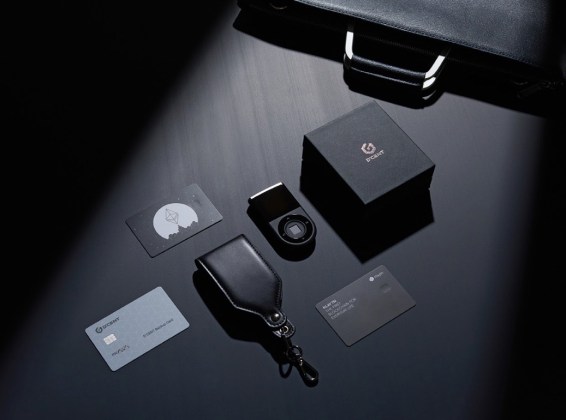
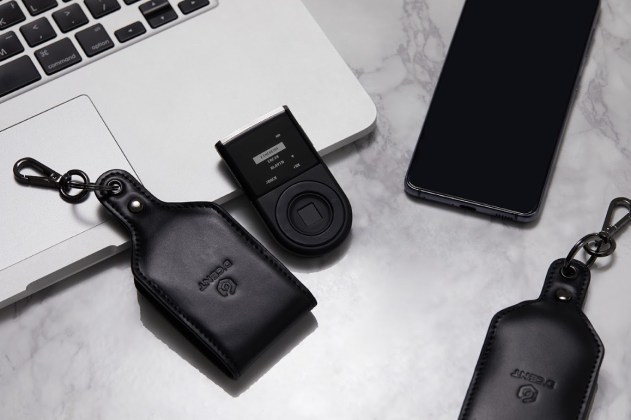
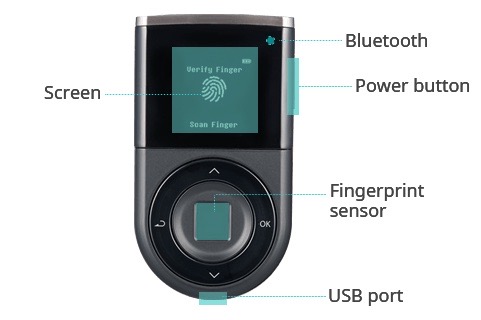
This is the most important product. It looks like a small device about the size of a car key fob. The front has a fingerprint sensor built in. The device connects to your phone through Bluetooth. It also has a USB-C port for charging and direct connection to a computer.
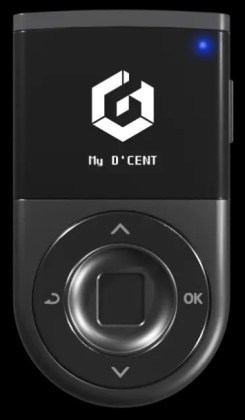
The biometric wallet stores private keys inside a secure element chip. The chip carries a CC EAL5+ certification, which is a high standard for hardware security. You need your fingerprint to approve any transaction. Fingerprint is required for transaction approval in normal use.
Users can buy a single unit or a 2X package that includes two devices. The 2X package works well for people who want a backup device ready to go.
D’CENT Card Wallet
The card wallet is a newer product. It looks like a credit card and fits in a regular wallet. This model uses NFC to connect with your phone. It supports Ethereum and over 50 EVM-compatible chains. The card also has a secure element chip inside.
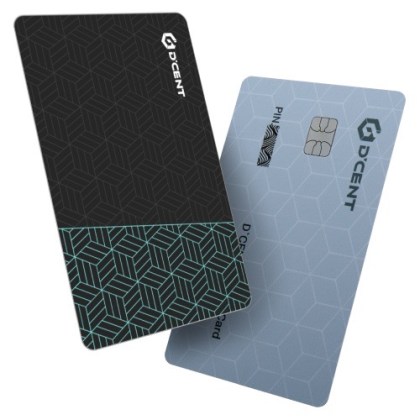
The card wallet costs less than the biometric version. It targets users who want cold storage but prefer a more portable form factor. The card includes a “smart backup” feature that simplifies recovery.
D’CENT Wallet Key Features
Fingerprint Authentication
D’CENT was the first hardware wallet to put a fingerprint sensor on the device. This feature sets it apart from competitors. Every transaction requires a fingerprint scan before the device signs it. A thief who steals the device cannot move funds without your finger. The sensor works fast. You touch it and the transaction goes through.
Non-Custodial Control
D’CENT is a non-custodial wallet. That means you hold your own private keys. The company does not have access to your funds. Your recovery phrase is generated on the device and never leaves it. This puts full control in your hands.
Advanced Security: The 25th-Word Passphrase
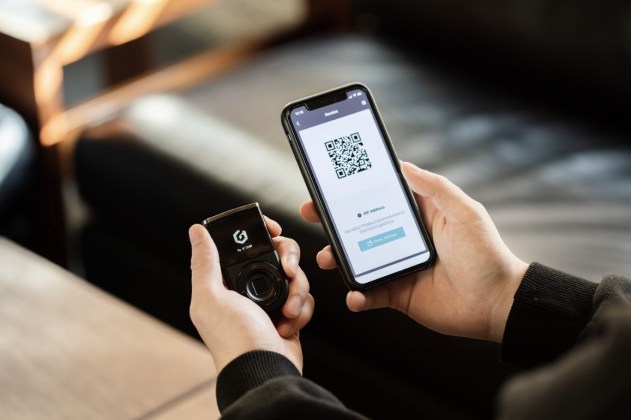
For users seeking an elite layer of protection, D’CENT supports a 25th-word passphrase feature. Unlike standard wallets where a passphrase merely adds a hidden account, enabling this on D’CENT creates a completely new set of private keys by combining your original 24-word recovery phrase with a custom word of your choice. This user-defined passphrase can be up to 8 characters long, consisting of a mix of letters and numbers.
It is important to note that setting up a 25th-word passphrase will replace the existing wallet on the device. Therefore, users must migrate their assets to a temporary address before activation. This setup ensures that even if someone manages to steal your 24-word recovery phrase, they cannot recreate your specific wallet or access your funds without knowing that exact 25th word. This provides a robust defense against seed phrase theft, though it requires the user to memorize or securely store the passphrase, as it is essential for any future wallet recovery.
Action Wallet: Bridging the Web3 Gap Through Education and Rewards
D’Cent positions itself as the Action Wallet because it believes a wallet should do more than just store assets. For many, the world of Web3, DeFi, and NFTs can feel overwhelming and complex. D’Cent solves this by turning its wallet into an educational gateway.
Through frequently updated on-chain missions and quests inside the mobile app, users are guided step-by-step through Web3 activities. Instead of just reading about how to swap a token, bridge assets, or interact with a new DeFi protocol, users learn by doing. These interactive missions simplify the Web3 experience, making it accessible even for beginners who previously only felt comfortable holding assets.
To encourage this learning journey, each completed action unlocks tangible rewards. By participating in these limited-time campaigns, users can earn token airdrops, and exclusive perks. It’s a “Learn-to-Earn” model where security and education go hand in hand.
Hardware wallet holders often receive prioritized access to higher-tier missions and larger rewards, providing a continuous incentive to move from passive holding to active exploration. Past campaigns, such as those with Skate and Wallet Connect, have seen thousands of users successfully navigate these tasks within hours, proving that with the right guidance, anyone can participate in the future of finance.
Multi-Wallet Integration
The D’CENT mobile app connects all the company’s products in one place. You can manage a biometric wallet, a card wallet, and a software wallet from the same app. The app connects to hardware devices through Bluetooth. This makes it easy to check balances and approve transactions without cables.
D’CENT Swap
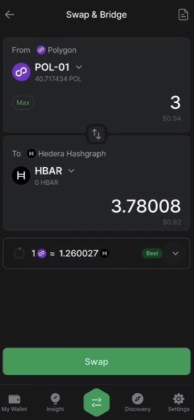
The app includes a swap feature called D’CENT Swap. It combines three functions: bridging, cross-chain swaps, and standard token swaps. Users can move assets between different blockchains without leaving the app. The interface shows gas fees upfront so you know what you are paying before you confirm.
Supported Coins and Blockchains
D’CENT supports over 100 mainnets and more than 4,800 tokens. The list covers most major blockchains including Bitcoin, Ethereum, XRP Ledger, Solana, and many others. It also supports EVM-compatible chains like Polygon, Arbitrum, and Avalanche.
If a token does not appear in the default list, users can add it manually as a custom account. This flexibility means you are not locked out of lesser-known assets.
The hardware wallet stores these assets offline. The software side of the app lets you view your portfolio, track prices, and manage transactions. Real-time data comes from CoinMarketCap and CoinGecko.
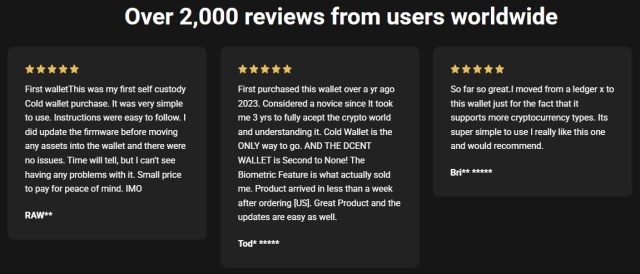
User reviews on the D’CENT site mention the wide support as a key reason people switch from other wallets. One reviewer said they moved from a Ledger X because D’CENT supports more cryptocurrency types.
Is D’CENT Wallet Safe?
The short answer is: yes, D’CENT is a safe wallet to use. Security is the main reason people buy hardware wallets. D’CENT builds its security around three elements: the secure element chip, fingerprint authentication, and offline key generation.
The biometric wallet uses a secure element chip rated CC EAL5+. This certification means the chip has passed tests for resisting physical attacks. Private keys live inside this chip and never leave it. Even if someone takes the device apart, they cannot extract the keys.
The wallet generates your recovery phrase offline. The device has no connection to the internet during setup. This prevents any online attack from capturing your seed phrase. The phrase only shows on the device screen. You write it down and store it somewhere safe.
The fingerprint sensor adds a second layer. Every outgoing transaction requires a fingerprint scan. Without it, the device will not sign. This stops someone who finds your device from draining your funds. It also stops malware on your phone from pushing through unauthorized transactions.
D’CENT states on its website that the wallet has a proven track record with zero hack incidents to date. This claim matters because hardware wallets exist to prevent theft. A track record of no breaches gives users confidence.
What Happens If You Lose the Wallet?
Losing the device does not mean losing your funds. The recovery phrase you wrote down during setup allows you to restore your wallet on a new device. The recovery phrase acts as the master key. Keep it offline and separate from the wallet. Anyone with the recovery phrase can take your funds.
Pricing and Fees
Hardware Costs
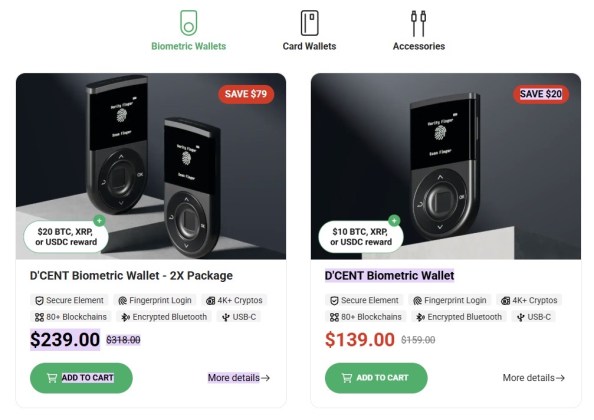
The D’CENT Biometric Wallet costs $139.00. The regular price is $159.00, so buyers save $20. The 2X Package, which includes two biometric wallets, costs $239.00 (regular $318.00, save $79).
The Card Wallet is more affordable. It costs $38.00 (regular $40.00, save $2). This model supports EVM chains only.
As of the current promotion, D’CENT offers a $10 ~ $20 BTC, XRP, or USDC reward with biometric wallet purchases.
Transaction Fees
D’CENT does not charge fees for storing assets. When you send crypto, you pay network transaction fees. These fees go to miners or validators, not to D’CENT. Gas fees change based on blockchain traffic. Ethereum fees go up when the network is busy. Bitcoin fees vary based on transaction size and network demand.
The D’CENT app gives users flexibility. You can choose from slow, normal, or fast transaction speeds. Faster speeds cost more. Slower speeds save money but take longer.
To move crypto assets, you typically need to pay a ‘Gas Fee’ using the network’s native token (like ETH for Ethereum or SOL for Solana). This can be a major hurdle if you have tokens but lack the native gas to move them. GasPass is D’CENT’s unique solution that covers these fees for you.
By removing the need to hold multiple native tokens just for fees, GasPass transforms D’CENT into a true ‘Action Wallet’—allowing users to send, swap, or engage in on-chain activities instantly and seamlessly. Currently, GasPass supports Ethereum, Kaia, Base, and Solana, and more networks are being added continuously to make the Web3 experience as easy as using a credit card.
Activating a new XRP wallet requires a 1 XRP deposit. This is not a D’CENT fee. The Ripple network locks this amount in every new wallet. You get it back only if you close the wallet.
How to Get Started With D’Cent?
Getting started with D’Cent is straightforward. The setup process takes about 10 minutes. Here is a step-by-step guide for the Biometric Wallet. The Card Wallet follows a similar process.
Step 1: Power On and Create Wallet
Hold the power button on the right side of the device for two seconds to turn it on. Select your preferred language, then choose “Create Wallet” to generate a new wallet.
Step 2: Set Up Security
Enter a PIN code between four and eight digits. Confirm the PIN by entering it a second time.
Next, enable biometric unlock. Place your finger on the fingerprint sensor and follow the instructions on the screen. Tap the sensor repeatedly until the device maps your finger completely. This step ensures the sensor recognizes your fingerprint every time you approve a transaction.
Step 3: Write Down Your Seed Phrase
The device displays your recovery seed phrase. This is a set of 24 words. Write these words down on paper. Store the paper in a secure location away from the device.
Do not store your seed phrase online. Do not take a photo of it with your phone. Do not share it with anyone. Anyone who gets these words can take your funds.
After writing the words down, the device asks you to enter the seed phrase to confirm you copied it correctly.
Step 4: Update Firmware
Connect the wallet to a computer using the USB-C cable. Check for the latest firmware updates. Installing updates ensures your device has the newest security patches and features.
Step 5: Download the App and Pair
Download the D’Cent mobile app from Google Play or the Apple App Store. Make sure you download the official app. Fake apps exist and can steal your funds.
Open the app and select “Biometric Wallet” as your wallet type. Choose a secure password for the app. Turn on Bluetooth on your phone.
On the Biometric Wallet, go to “Settings,” then “Bluetooth,” and select iOS or Android depending on your phone. Return to the app to complete the pairing. Once connected, you can view your portfolio, send and receive assets, and access other important app’s features through on-chain missions and interactive rewards (like the ones seen in Tap That Drop, a very successful campaign D’CENT Wallet’s team ran last year) and D’Cent Swap.
D’CENT Wallet vs Competitors
The hardware wallet market has several established players. Here is how D’CENT compares to Ledger, and Trezor.
| Feature | D’CENT Biometric | Ledger Nano X | Trezor Model T |
| Security Chip | CC EAL5+ secure element | CC EAL5+ secure element | None |
| Biometric | Fingerprint sensor | None | None |
| Connection | Bluetooth, USB-C | Bluetooth, USB-C | USB-C |
| Mobile App | Yes, full functionality | Yes, full functionality | Limited (third-party apps) |
| Supported Chains | 100+ mainnets | 50+ mainnets | 16+ mainnets |
| Display | Small screen | Small screen | Touchscreen |
| Price | $139 | $149 | $219 |
| On-Chain Missions and Interactive Rewards (Action Wallet) | Yes | No | No |
| Gas Fee Support | Yes(Gas Pass) | No | No |
D’CENT stands out for its fingerprint sensor and rewards program. The GasPass feature adds practical value by covering network fees. Ledger and Trezor have longer brand histories. Trezor lacks a secure element, which some security experts note as a gap.
User reviews on the D’CENT site mention people switching from Ledger because D’CENT supports more assets. Another reviewer said they chose D’CENT for the biometric feature after trying Ellipal and Safepal.
FAQs
Who owns the D’CENT wallet?
D’CENT is made by IoTrust, a South Korean company. IoTrust focuses on hardware security and has been operating since 2014. The company launched the D’CENT biometric wallet in 2018.
What if I lose my D’CENT wallet?
Your funds are not gone. Use the recovery phrase you wrote down during setup to restore your wallet on a new device. The recovery phrase is a set of 24 words. Keep it offline and in a secure location. Anyone with these words can access your funds, so guard them carefully.
Which is the safest crypto wallet?
No wallet is 100% safe because security depends on how you use it. Hardware wallets are the safest option for storing large amounts. Among hardware wallets, D’CENT ranks as one of the safest. It uses a certified secure element, stores keys offline, and adds fingerprint authentication. The combination of these features makes unauthorized access difficult. Other top options include Ledger and CoolWallet, but D’CENT’s biometric layer gives it an edge for users who want physical security tied to the device.
Is D’CENT Wallet easy to use?
Yes, D’CENT is easy to use. The setup walks you through each step, and the mobile app connects to the hardware wallet via Bluetooth so you manage everything without dealing with cables or complicated menus.
Conclusion
Overall, D’CENT delivers a good hardware wallet with clear advantages. The fingerprint sensor makes transactions simple and adds real security. The app does more than show balances. It helps users earn rewards through campaigns and covers gas fees through GasPass. Support for over 100 blockchains means you can store almost any asset without juggling multiple wallets.
The price sits in the middle of the market. The biometric model costs $139, which is less than the Trezor Model T and the same as the Ledger Nano X. The card wallet offers a cheaper entry point for users focused on EVM chains.
For newcomers, D’CENT is easy to set up. The instructions are clear, and the app walks you through the process. For experienced users, the 25th-word passphrase and advanced controls provide room to customize security.
The main downside is that some advanced users may prefer a device with a larger screen or open-source firmware. But for most people, D’CENT strikes a good balance between security, usability, and extra features.